As of 22 October 2026. This article covers the vulnerabilities CVE-2026-109618 and CVE-2026-109619.
What you need to know about your website right now
You have read about a critical PHP vulnerability and are wondering whether you now need to look after your server too. There is a manageable first step: check whether your hosting provider has already installed the security update for your website. With managed web hosting, the provider usually takes care of these updates, often automatically. Yours may already be done. Confirmation for your hosting plan and domain will help you know where you stand.
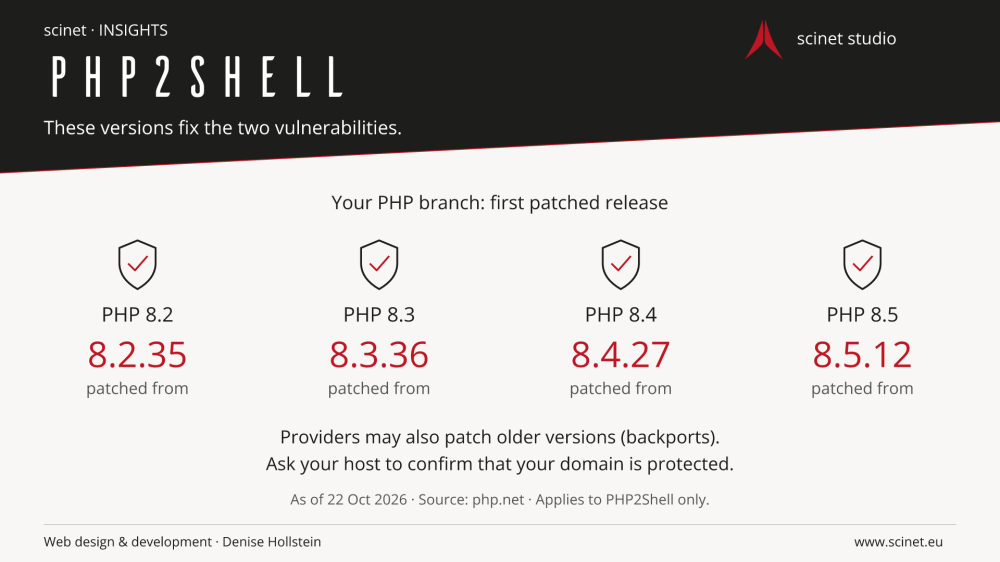
PHP2Shell affects the technology behind many websites. Fixes have been available since 21 October. For the currently supported PHP branches, the releases are 8.2.35, 8.3.36, 8.4.27 and 8.5.12. Explicitly confirmed security fixes in older provider packages can also address these vulnerabilities. Updating WordPress alone is not enough. Official PHP security announcement.
If you are unsure what your version number or your host's reply means, get in touch with me. I can help you check your website's status and work out the next steps with your provider.
Quick answers: your website FAQ
What does PHP2Shell mean for my website?
If your website uses a vulnerable PHP version, attackers may exploit these flaws. This also affects websites with an up-to-date WordPress installation. Once the PHP runtime has received the appropriate fixes, these two vulnerabilities are closed. The announcement alone does not mean your website has been hacked.
How can I check whether I am affected?
Check your host's security notice for your hosting plan. In WordPress, you can usually find the PHP version under Tools → Site Health → Info → Server. Compare the full number with the table below. For older or unclear version numbers, ask your host to confirm that the fixes are installed.
Doesn't my hosting provider update PHP automatically?
With managed web hosting, the provider usually handles PHP security updates, often automatically. Yours may already be done. A status notice or a quick enquiry will tell you whether your specific plan and domain are covered. For self-managed servers, your administrator is responsible.
Which PHP versions are protected against these vulnerabilities?
The first patched official releases are PHP 8.2.35, 8.3.36, 8.4.27 and 8.5.12. Explicitly confirmed provider backports can also close the vulnerabilities. This refers to fixing PHP2Shell, not to a guarantee that a website is secure overall.
How can I check my PHP version with phpinfo() without WordPress?
If you have access to your website's files, you can temporarily create a PHP test file. The code example and steps are in the section ‘Read your PHP version with phpinfo()’ below. Open the file through the exact domain you want to check and note the full ‘PHP Version’. Delete the file straight afterwards: even the limited output includes server information. If you are not comfortable working with website files, get in touch and I can help you check.
What should I do if my PHP version is outdated?
If you see PHP 5.6, 7.4, 8.0 or 8.1, for example, your website uses a branch that no longer receives security updates from the PHP project. A provider may supply its own fixes, but needs to confirm this explicitly. Even in newer branches, versions such as 8.2.34, 8.3.35, 8.4.26 or 8.5.11 lack these fixes unless the provider has backported them. Get in touch with me. I can help you clarify protection with your host and prepare a version change if needed. Older websites in particular need a backup and a compatibility check first.
What if I am still unsure?
Get in touch through the scinet contact page. Tell me your website address and hosting provider. I will help you make sense of the information and work out whether anything still needs doing. You do not need to understand the technical terms yourself.
The following sections explain these answers in more detail and link to the original sources.
What PHP has to do with your website
You write a blog post, someone sends you an enquiry or places an order in your shop. Behind the website you can see, programs process these tasks. On many websites, PHP handles part of that work on the server. WordPress, Drupal and Joomla are familiar examples. A custom-built website can use PHP too.
The newly disclosed flaws are in this shared foundation. That means even a carefully maintained website can be affected. Researchers demonstrated the vulnerabilities using WordPress, Drupal and Joomla, among others; the flaws are not limited to these systems. Research and background from Wiz.
In everyday terms: Your website needs both its own updates and a maintained server environment. They go together.
How to check whether your website is still affected
1. Start with your hosting provider
Open your hosting account and look for a notice about “PHP2Shell” or the two CVE numbers. These numbers identify the vulnerabilities. Check which products and PHP versions the notice covers. An update for managed WordPress hosting does not tell you the status of a self-managed server at the same company.
Providers really are taking action: on 21 October, Hetzner reported fixes for PHP 7.4 and 8.0 through 8.5 on its web hosting and managed servers. On 22 October, it confirmed fixes for 5.6 and 7.3 too. This is one provider's example, not an all-clear for every hosting service. Hetzner status notice.
2. Find your website's PHP version
In WordPress, you can usually find it under Tools → Site Health → Info → Server → PHP version. You do not need to change anything there. Write down the full number, such as “8.4.27”, rather than just “8.4”. WordPress Site Health documentation.
Without WordPress, look for the PHP settings for your domain in your hosting account. At ALL-INKL, for example, you can find the selection in KAS when editing the relevant domain or subdomain. If the menu only shows a branch such as “8.4”, ask for the full version and confirmation of the security update. ALL-INKL: PHP versions and settings.
Read your PHP version with phpinfo()
You do not use WordPress, and your hosting menu does not show a full version number? If you are comfortable using your host's file manager or SFTP, you can check it directly on your website:
- In a plain text editor, create a new file named
check-php-version.php. Add only this code:
<?php
phpinfo(INFO_GENERAL);- Upload the file to the web directory for the domain you want to check. This is the folder that serves that website. Where possible, restrict access using your host's directory protection.
- Open
https://your-domain.com/check-php-version.phpin your browser, replacing “your-domain.com” with your domain. Note the full PHP Version shown at the top. Check each website separately if your domains use different PHP settings. - Delete the file from the server as soon as you have read the version. Then check that its address no longer displays PHP information. Even this limited output contains server information and should not remain publicly accessible.
INFO_GENERAL limits the output compared with a full phpinfo() call. The file shows the PHP runtime used for that web request; it does not install an update or automatically identify provider backports. If you only see source code or the file downloads instead, remove it and ask your host for help. PHP documentation for phpinfo().
In everyday terms: Check the number, note it down and remove the test file. If that feels too technical, I can help you with the check.
If your PHP branch is no longer supported
PHP 5.6, 7.4, 8.0 and 8.1 no longer receive security updates from the PHP project. A special PHP2Shell fix from your host may close these two vulnerabilities, but it does not replace ongoing maintenance. Let's work out which supported branch suits your website. Before changing versions, your website needs a backup and a compatibility check. Officially supported PHP versions.
In everyday terms: You do not have to decide which number is right on your own. Get in touch; I will help you check and plan a suitable next step.
3. Make sense of the result
- A patched version or a confirmed provider update: These two vulnerabilities have been addressed. That is not a general guarantee that the entire website is secure.
- An older number without confirmation: Ask promptly. Providers can add security fixes without changing the visible base version to the new official PHP release number.
- You cannot get a clear answer: Ask the person who manages your hosting or website to check.
Fixes added to older versions are called “backports”. Ubuntu, for example, lists a patched package numbered 8.3.6-0ubuntu0.24.04.13. Judging it by “8.3.6” alone would give the wrong impression. Ubuntu: patched packages.
In everyday terms: You need a reliable answer about whether the update has reached your website. An unfamiliar version number is a reason to ask.
Which PHP versions fix PHP2Shell?
These official security releases contain the fixes. Compare your version within the same row:
| Your PHP branch | Patched from |
|---|---|
| PHP 8.2 | 8.2.35 |
| PHP 8.3 | 8.3.36 |
| PHP 8.4 | 8.4.27 |
| PHP 8.5 | 8.5.12 |
“PHP 8” or “PHP 8.4” is not enough information. Older branches need an explicitly confirmed provider fix or a move to a supported version. The table does not cover provider packages with different numbering. The researchers' version overview.
In everyday terms: The digits after the second dot matter too. You do not automatically need a different PHP branch if your current branch receives the appropriate security fix.
Who installs the update, and what should you do?
With a standard web hosting plan, your provider is your first contact for the PHP runtime. If you run a self-managed server, your administrator needs to handle it. Separate containers and bundled PHP installations must also be considered. An update in one place does not necessarily reach every other installation. Guidance from the Dutch NCSC.
You can send your host this message:
Hello, has the PHP runtime for my domain [your domain] been patched against CVE-2026-109618 and CVE-2026-109619? Which patched version or backport is active? Have the affected PHP processes been restarted, and is there anything I still need to do for my hosting plan?
Restarting matters because running services need to start using the updated software. Ubuntu explicitly points out that this may still be necessary after automatic package updates. Ubuntu: updates and restarts.
If you need to change PHP branches, arrange this with whoever maintains your website. An older website may need adjustments. Afterwards, check the important tasks: do the contact form, login and, if relevant, checkout still work? ALL-INKL also explicitly recommends checking functionality after a version change. Provider guidance.
In everyday terms: With managed hosting, you usually do not need to run server commands. Find out who is updating PHP, then check that your website works as expected.
How serious are these vulnerabilities?
A severity rating of 9.2 out of 10 means these vulnerabilities are critical. Under certain conditions, attackers can run their own code without logging in or read sensitive data from memory. The researchers describe affected PHP versions going back to 5.4. Technical investigation by Wiz.
In the first flaw, PHP mishandles incomplete internal data after an out-of-memory error. In the second, references to memory that has already been freed can carry over into a later request. The technical names are “OOM corruption” and “stale global state”. You do not need to remember them; they explain why PHP itself needs to be fixed. PHP advisory for the first flaw and the second flaw.
Cloudflare has already observed attack traffic. A protective filter in front of a website can help, but it does not replace the PHP update. Changing individual PHP settings does not close every attack path either. Cloudflare: observations and protection, NCSC: limits of temporary measures.
In everyday terms: Get confirmation of the update today. The announcement does not, by itself, mean that your website has been hacked.
What if your website is down or the update is still missing?
A website may be temporarily unavailable because of a protective measure or maintenance. An outage alone does not establish that there has been an attack. Ask your provider about the cause and current status.
If a publicly accessible application is still vulnerable and cannot be updated promptly, CERT-EU recommends considering temporarily disconnecting it from the public internet. Your administrator or host should handle that. CERT-EU recommendations.
Do not rely on a maintenance page inside WordPress for this. The PHP runtime can remain accessible; some attack paths begin before the website's own code runs. PHP: affected server configurations.
If you notice unfamiliar redirects, new user accounts or other changes, have them investigated separately. Installing an update afterwards does not tell you whether data was exposed earlier. A website that looks normal cannot reliably rule that out either. The research team describes these limits to detection. PHP2Shell: investigation guidance.
In everyday terms: An outage needs an explanation. A confirmed attack needs an investigation as well as an update.
This article explains the information published as of 22 October 2026. It does not replace checking an individual website. The linked original sources may have been updated since.