Favicon not showing in Bing? Here is how to fix it
VeröffentlichtKategorie: SEO (Search Engine Optimization)
Veröffentlicht am 11.08.2026
Your website favicon is implemented correctly and works in the browser, yet it still does not appear in Bing search results? That is exactly what happened with scinet.eu.
I checked the technical implementation, provided several favicon formats and had Bing crawl the website. The favicon still remained missing from the search results.
In the end, the solution was surprisingly simple: submitting a support request directly to Bing.
In my case, Bing Webmaster Support responded within around 30 minutes and updated the favicon on their end. It appeared correctly in the search results the very next day.
Here is what you should check first and how to contact Bing if everything is technically correct.
What is a favicon?
A favicon is the small logo or symbol used to identify a website in browser tabs and next to bookmarks, among other places.
Search engines can also display a favicon next to a search result. This makes a website easier to recognise visually on SERPs – Search Engine Results Pages.
If your own favicon is missing there even though it works on the website, this does not necessarily mean that the website is configured incorrectly.
1. Add the favicon to the website correctly
First, check that the favicon is included correctly in the website <head>.
On scinet.eu, I use several formats:
<link rel="icon" type="image/x-icon" href="https://www.scinet.eu/favicon.ico">
<link rel="icon" type="image/png" href="https://www.scinet.eu/favicon.png">
<link rel="icon" type="image/svg+xml" href="https://www.scinet.eu/favicon.svg">
I would still recommend providing the classic favicon.ico in the root directory of the domain.
For example, the files should be available at these addresses:
https://www.example.com/favicon.ico
https://www.example.com/favicon.png
https://www.example.com/favicon.svg
The HTML code alone is not enough. A crawler must be able to retrieve the files.
2. Check whether the favicon is accessible
Start by opening the favicon files directly in your browser.
You can get a more meaningful result by checking the HTTP status with curl:
curl -I https://www.example.com/favicon.icoIdeally, the response should include:
HTTP/2 200Responses such as these would indicate a problem:
403 Forbidden
404 Not Found
You should also avoid unnecessary redirect chains.
If you use a firewall, bot protection, a CDN or other security mechanisms, check whether Bingbot might be blocked from retrieving the files.
3. Check robots.txt and indexing
Bing must be able to crawl the website and the required resources.
Rules in robots.txt or other robots directives that prevent Bing from crawling or indexing content are therefore another possible cause.
You can also use URL Inspection in Bing Webmaster Tools to see how Bing processes a URL.
4. Notify Bing about the website again
After changing or adding a favicon, Bing first needs to discover the update.
You can use URL submission, XML sitemaps and IndexNow to help with this.
However, you should not expect the change to appear in search results immediately.
5. What if the favicon is still missing?
This is exactly where I got stuck with scinet.eu.
The website was indexed. The favicon existed. The files were accessible, and the relevant <link> elements were present in the HTML.
Bing still did not show the favicon in its SERPs.
If you have ruled out the usual technical causes and given Bing enough time to crawl the website again, I would not keep trying endless combinations of favicon files, filenames or HTML variants.
Instead, contact Bing Webmaster Support.
Contact Bing Webmaster Support
For my request, I selected “Crawling issue” as the issue type because the website itself was already indexed.
My support request to Bing
I briefly described the problem and included the favicon tags that were actually being used:
Hello,
the favicon of my website https://www.scinet.eu/ is not displayed in Bing search results.
It is implemented correctly and publicly accessible:
<link rel="icon" href="https://www.scinet.eu/favicon.ico">
<link rel="icon" href="https://www.scinet.eu/favicon.png">
<link rel="icon" href="https://www.scinet.eu/favicon.svg">
The website itself is indexed. Could you please check why the favicon is not being displayed?
Thank you
Bing responded surprisingly quickly
In my case, Microsoft responded to the request within only around 30 minutes.
The key statement in the reply was:
“the favicon has been updated on our end”
Bing also told me that it could take approximately two to three days for the change to become visible in search results.
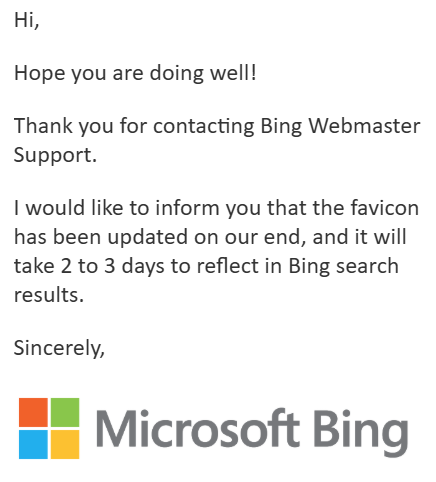
Interestingly, I did not have to wait that long: the correct favicon appeared in Bing search results the very next day.
The problem apparently was not with the website
For me, this is the most important lesson from this case.
Bing did not ask me to change the favicon files or use different HTML tags. Instead, support explicitly stated that the favicon had been updated on their end.
In this particular case, that strongly suggests that the issue involved Bing processing or associating the favicon rather than the technical implementation on scinet.eu.
If you have the same problem, you should not automatically assume that something is wrong with your favicon.
Checklist: Bing is not showing the favicon
- Is the favicon included correctly in the
<head>? - Can
/favicon.icobe opened directly? - Does it return HTTP status 200?
- Are suitable favicon formats available?
- Is access blocked by
robots.txt, a firewall or bot protection? - Is the website itself indexed by Bing?
- Have you inspected or resubmitted the URL in Bing Webmaster Tools?
- Have you given Bing enough time to crawl the website again?
- Is the favicon still missing? → Contact Bing Webmaster Support.
Conclusion
If Bing does not display a favicon even though it is implemented correctly and publicly accessible, there is no need to spend days repeatedly changing the HTML.
In my case, a short request to Bing Webmaster Support solved the problem.
Microsoft updated the favicon on the Bing side, and it appeared correctly in the SERPs the following day.
If you have checked all the technical points and Bing still does not show your favicon, you can submit a support request to Bing directly.
