
You read “Bootstrap 6 is here” and perhaps your first thought is: Do I need to rebuild my website again? Take a breath. A new version number is not a task on your to-do list. What matters is what has changed underneath, and whether that change actually helps your project.
Bootstrap 6.0.0-alpha.1 was released on 8 October 2026. This is the first alpha of the new major version. Things may still change before the stable release. The team says Bootstrap 5 remains supported and has announced version 5.4. The announcement does not give a firm end-of-support date for Bootstrap 5 yet. Source: official release announcement.
Article updated: 12 October 2026. This comparison covers Bootstrap 6 Alpha 1, Tailwind CSS 4 and Bulma 1.
What Bootstrap actually does for your website
Imagine building a website with navigation, forms, buttons and small message windows. You need many of these elements again and again. Bootstrap provides their styling and, where needed, JavaScript. You start with existing building blocks and adapt them to your project. It is a tool for the interface, rather than a CMS for managing your blog posts.
The new version becomes interesting where those building blocks gain flexibility. A new brand colour, different spacing, a dark colour scheme: changes like these should flow through the interface in a predictable way.
What is new in Bootstrap 6?
More design decisions can be controlled directly through CSS
Bootstrap 6 puts CSS variables at the centre of customization. Shared values, often called design tokens, control properties such as colours and spacing. Many adjustments can therefore happen at runtime in the browser. Sass remains relevant for building the system and generating variants. Documentation: CSS variables.
For you as a website owner, this offers a practical opportunity: as your visual identity develops, your development team should have fewer scattered values to track down. That only works if the website uses those shared values consistently. A framework will not tidy up years of custom code on its own.
The browser takes on more of the work
The new accordion uses the native HTML elements <details> and <summary>. Basic opening and closing needs no Bootstrap JavaScript. That can be useful for a section of frequently asked questions, for example. Documentation: Accordion.
Dialog windows now use the native <dialog> element, with Bootstrap adding its styling and controls. This means the framework does not have to recreate all the underlying behaviour itself. You still need to check how it works in the actual project. Documentation: Dialog.
JavaScript and tooling are being modernized
The JavaScript plugins are supplied as ES modules. Browser script tags therefore need type="module"; an old script setup cannot simply stay unchanged. Individual plugins can also be imported selectively. Documentation: JavaScript.
New additions include a combobox, datepicker and stepper. Sass moves to @use and @forward, while Floating UI replaces Popper for floating elements. Your team needs to account for these changes in dependencies and the build process. Documentation: Migration.
The trade-off: migration needs attention
Bootstrap 6 requires Chrome and Edge 130, Firefox 132, and Safari 18 or newer. It supplies no corresponding fallbacks or polyfills below that baseline. Before upgrading, I would look at the browsers your visitors actually use. Older devices can make a real difference to the decision. Documentation: supported browsers.
HTML classes change too: col-md-6 becomes md:col-6. The lg breakpoint moves from 992 to 1024 pixels, xxl becomes 2xl, and colour variants move to a new theme pattern. Existing templates need deliberate revision. Source: migration guide.
Your homepage might even look quite reasonable after replacing the files. That tells you little about whether a form, a menu or a dialog still works on a phone. Those are the places I would test: the paths people take to contact you, book something or make a purchase.
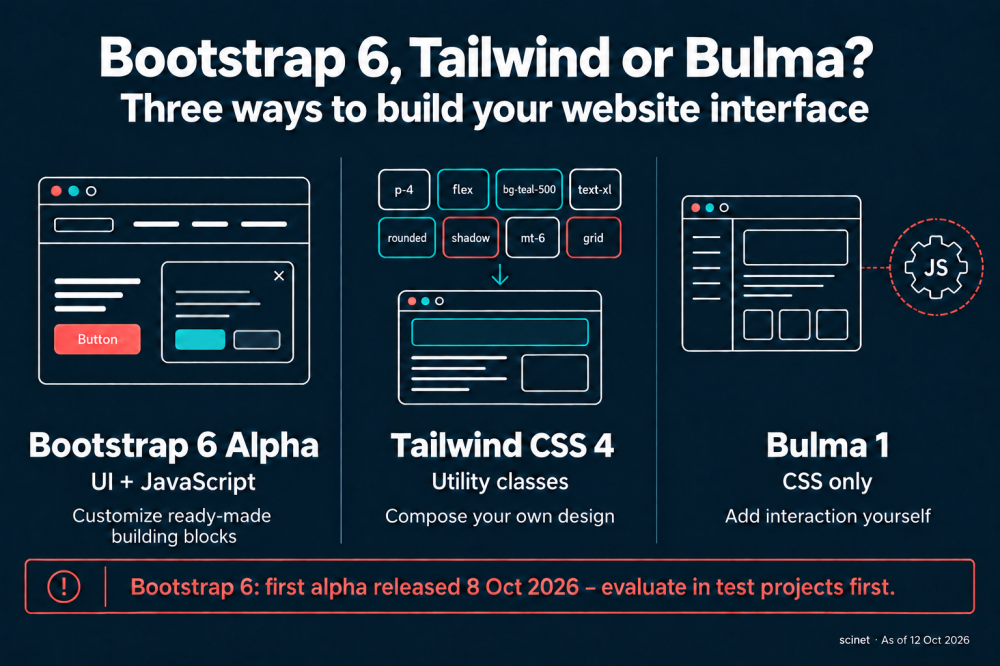
Bootstrap, Tailwind or Bulma: which fits your project?
All three help you design websites, but they distribute the work differently. I would base the choice on what your team wants to design and maintain itself.
Tailwind CSS: freedom to compose your own interface
Tailwind uses small utility classes directly in your HTML. You combine rules for spacing, colour, size and layout into your own components. That gives you precise control over an individual design. Recurring patterns should be collected in well-maintained templates or components. Documentation: utility classes.
In version 4, themes are configured through CSS and @theme. The build generates the styles needed for detected classes. The quick Play CDN setup is explicitly intended for development, not production. Theme variables · Installation and Play CDN.
My assessment: Tailwind is a good fit when a distinctive design and a clear component structure are central to the project. The CSS framework alone does not give you a working dialog controller. That still needs your own implementation or an appropriate additional library.
Bulma: ready-made styling, interaction in your hands
Bulma supplies CSS components for common interfaces. Version 1 lets you customize their appearance through CSS variables. This is a convenient starting point when you want an existing visual structure. Documentation: Bulma CSS variables.
The Bulma package contains no JavaScript. Its modal documentation includes example code, but integrating and managing the behaviour remains the project's responsibility. That gives you freedom along with additional work. Documentation: Bulma Modal.
My assessment: this can suit a straightforward website or a team with its own JavaScript solution. If you need lots of complex interactions, account for that effort from the beginning.
| Criterion | Bootstrap 6 Alpha | Tailwind CSS 4 | Bulma 1 |
|---|---|---|---|
| Starting point | Styled components | Small composable classes | Styled CSS components |
| Interaction | Native elements and JS plugins | Your own solution or an addition | Your own solution or an addition |
| Customization | CSS tokens and Sass | Utilities and CSS theme | CSS variables and Sass |
| What I would watch | Alpha status and migration | Component structure and build | Work needed for interactive behaviour |
Tailwind 4 also requires modern browsers: Chrome 111, Safari 16.4 and Firefox 128 are the documented minimum versions for its core features. Changing frameworks does not automatically solve older-browser requirements. Source: Tailwind compatibility.
What I would recommend for your project
For an existing Bootstrap 5 website, I would first identify the benefit of migrating. Which specific difficulty should version 6 solve? If there is no clear answer yet, there is little reason to rebuild a functioning interface simply because the version number has changed.
For a test project, however, the alpha offers a useful opportunity. Build a typical page with navigation, a form and a dialog. Check it with a keyboard, on a phone and in the browsers your audience uses. You will soon get a better idea of how much of your existing code still fits.
For a new project, I would think through that same small interface with each shortlisted tool. How much custom design do you need? Which interactions belong in the project? And who will maintain it two years from now? Those questions lead to a decision that lasts longer than the excitement around a release.
None of these frameworks automatically makes a website accessible or fast. Content, contrast, labels, keyboard operation and the files actually delivered remain part of the project's work. Bootstrap explicitly acknowledges that responsibility as well. Documentation: Accessibility.
What interests me most about Bootstrap 6 is its greater use of capabilities that browsers now provide themselves. That is a sensible direction. Whether it should already be the next step for your website is something you can decide based on your project. A small, careful trial gives you a much stronger basis for that choice.